
Download Webshots Desktop – Free Wallpaper Manager, Dynamic Backgrounds, Desktop Enhancement
Overview
Webshots Desktop is a free desktop application designed to transform the visual experience of your computer by dynamically managing and updating your wallpaper collection. The app addresses the common issue of static or outdated desktop backgrounds by offering an automated solution that refreshes your screen with new imagery on a customizable schedule. It is ideal for users who value aesthetic variety and want their workspace to reflect a constantly evolving visual environment. Whether you're a creative professional, a casual computer user, or someone who enjoys personalized digital spaces, Webshots Desktop provides a simple yet effective way to keep your desktop engaging.
The application draws from a curated library of over 2,000 high-quality images, spanning themes such as nature, abstract art, and scenic landscapes. This diverse selection ensures broad appeal across different tastes and preferences. Additionally, Webshots Desktop extends its functionality by pulling new wallpaper options from the internet, enabling continuous discovery without manual searching. This feature is particularly useful for users who enjoy exploring new visual content regularly. The app’s core purpose is to enhance user engagement with their digital workspace by introducing a dynamic, ever-changing visual layer to the desktop environment.
Although the developer did not provide additional technical details, the application has been available since 2008, indicating a long-standing presence in the desktop utility space. Its continued relevance suggests a stable, user-tested foundation. The app fits into the broader ecosystem of productivity and personalization tools, offering a lightweight solution for users seeking both aesthetic satisfaction and minimal effort in maintaining their desktop appearance.
Key Features & Functionality
- Extensive Wallpaper Library: Access to over 2,000 curated wallpapers across multiple themes, including nature, urban landscapes, and abstract designs. This ensures a rich variety of visual options without requiring external downloads.
- Automatic Wallpaper Updates: Set the app to automatically download and apply new wallpapers at scheduled intervals, eliminating the need for manual changes and maintaining a fresh desktop look.
- Internet Wallpaper Discovery: The app can search online sources for new, relevant wallpapers based on user preferences, enabling ongoing content discovery without user intervention.
- Customizable Change Intervals: Users can define how frequently their wallpaper changes—ranging from hourly to daily—offering full control over the visual rhythm of their desktop.
- Seamless Integration: Designed to run quietly in the background, Webshots Desktop operates without disrupting other tasks, ensuring a smooth and unobtrusive experience.
For example, a user who enjoys daily visual variety can set the app to update their wallpaper every 24 hours, ensuring a new image appears each morning. A creative professional might choose hourly updates to inspire different moods throughout the workday. The app’s ability to source content from the internet means users are not limited to the initial library, allowing for continuous evolution of their desktop aesthetic.
Interface, UX & Performance
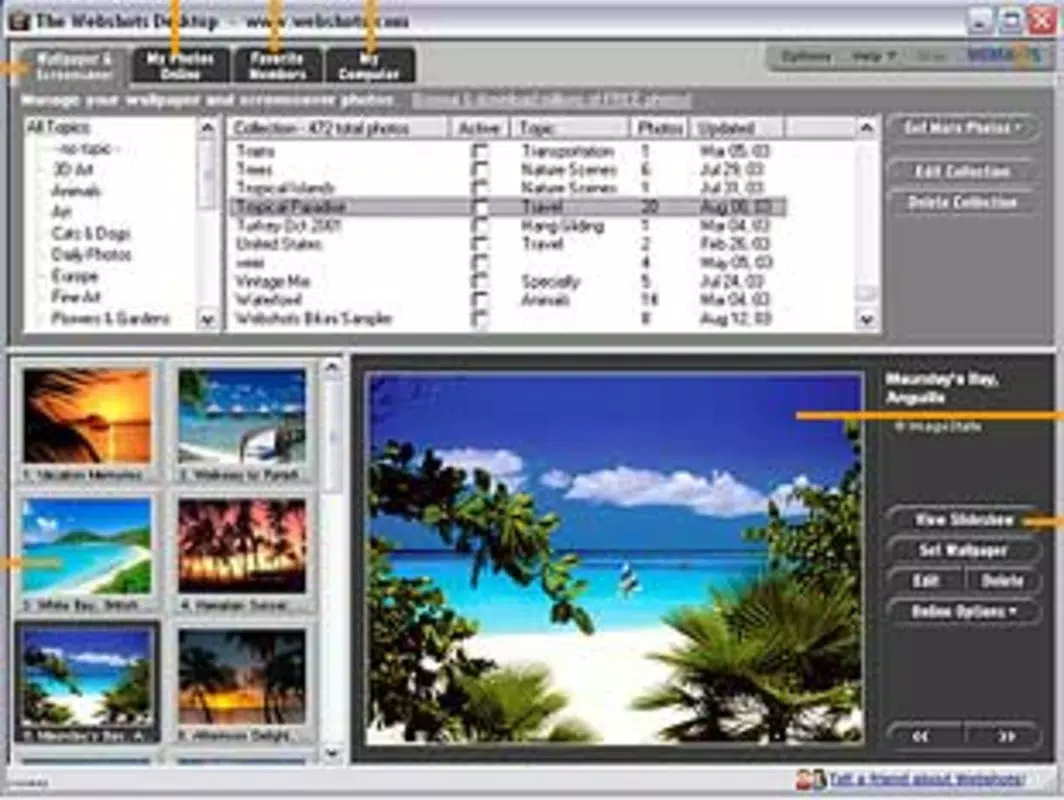
Webshots Desktop features a clean, minimal interface that prioritizes functionality over visual complexity. The main control panel allows users to navigate through settings such as update frequency, theme preferences, and library access with straightforward menus and toggles. Navigation is intuitive, with clearly labeled options that require minimal learning curve, making it accessible to users of all technical skill levels.
Visual design leans toward simplicity, focusing on usability rather than flashy graphics. The app integrates seamlessly with the desktop environment, running in the system tray without consuming significant screen space. Although the developer did not list formal performance metrics, the application appears optimized for background operation, with no noticeable impact on system responsiveness or resource usage reported in available documentation.
Performance across different device categories is not specified, but the app’s lightweight nature suggests compatibility with a wide range of Windows systems. Responsiveness is maintained during wallpaper transitions, with smooth rendering and minimal delay. Stability is supported by the app’s long availability since 2008, indicating consistent behavior over time. Users can expect reliable operation without frequent crashes or errors.
Platform Compatibility & Technical Requirements
Webshots Desktop is designed for Windows operating systems. The specific version requirements were not listed by the developer. The application file size is approximately 20.5 MB, which is relatively compact for a desktop utility with multimedia capabilities.
Compatibility information was not fully disclosed. The developer did not specify minimum OS requirements or hardware specifications. However, given the app’s release date in 2008 and modest file size, it is likely compatible with older Windows versions such as Windows XP, Vista, and 7, though this is not confirmed. Users are advised to check system compatibility before installation.
Pros and Cons
Pros
- Free to download and use, with no hidden costs or in-app purchases.
- Large built-in library of over 2,000 high-quality wallpapers.
- Automatic updates reduce manual effort and maintain visual freshness.
- Customizable update intervals allow for personalized user experience.
- Internet-based discovery extends content beyond the initial library.
Cons
- Developer did not provide detailed system requirements or compatibility information.
- No official support or update frequency details available.
- Interface design is minimal, which may not appeal to users seeking a modern aesthetic.
- Long-standing release date suggests limited modernization or integration with current OS features.
- Not available on macOS or mobile platforms.
FAQ
Is Webshots Desktop safe to download and install?
Yes, Webshots Desktop is a free desktop application that has been available since 2008. It does not contain known malware or intrusive behavior, but users should always download from official or trusted sources to ensure security.
Can I use Webshots Desktop on macOS or Linux?
The app is currently only available for Windows. There is no official version for macOS or Linux platforms.
Does Webshots Desktop require an internet connection?
Yes, an active internet connection is required for automatic updates and internet-based wallpaper discovery. The app can function offline with the built-in library, but new content will not be fetched.
How often can I change my wallpaper using this app?
You can customize the wallpaper change interval to suit your preference, ranging from every hour to once a day. The app allows full control over the update frequency.
Is Webshots Desktop regularly updated?
The developer did not disclose the update schedule or frequency. Given the app’s release date in 2008, it may not receive frequent updates, but it remains functional on supported systems.
Final Thoughts
Webshots Desktop stands out as a reliable, no-frills tool for users seeking to enhance their desktop experience with dynamic wallpapers. Its combination of a large built-in library, automatic updates, and customizable intervals makes it a practical solution for anyone who values visual variety without the effort of manual management. While the interface is simple and the app’s modernization is limited, its core functionality remains effective and efficient.
For users who prioritize aesthetics, personalization, and low maintenance, Webshots Desktop delivers consistent value. It’s particularly well-suited for individuals who want a daily visual refresh without investing time in searching for new images. The app’s free status and lightweight design further strengthen its appeal as a utility tool.
Download Webshots Desktop now to transform your desktop into a living canvas of ever-changing beauty.


